Friday, August 12, 2011

How to use SQL Server 2008 R2 Import and Export Wizard to import a CSV file into SQL Azure

The SQL Server 2008 R2 Import and Export Wizard will allow you to import a CSV ‘flat’ file directly into SQL Azure. The process is relatively simple, but it’s not obvious. The following steps will help guide you through the process.

The SQL Server Import and Export Wizard is available on the SQL Server 2008 R2 media, so you must obtain your organization’s copy of SQL Server 2008 R2 software.

1. Run the wizard from the Windows Start menu, Start à Programs à SQL Server 2008 R2 à Import and Export Data.

2. Select Flat File Source as the data source, browse for your CSV file, and then select the settings appropriate for your file. For example, the fields in my file are surrounded by double-quotes if they contain commas, so I select double-quotes as my text qualifier. Also, the column names are found in the first row of my file. Click Next.

3. Verify that your data looks as you expected. Click on Advanced on the left.
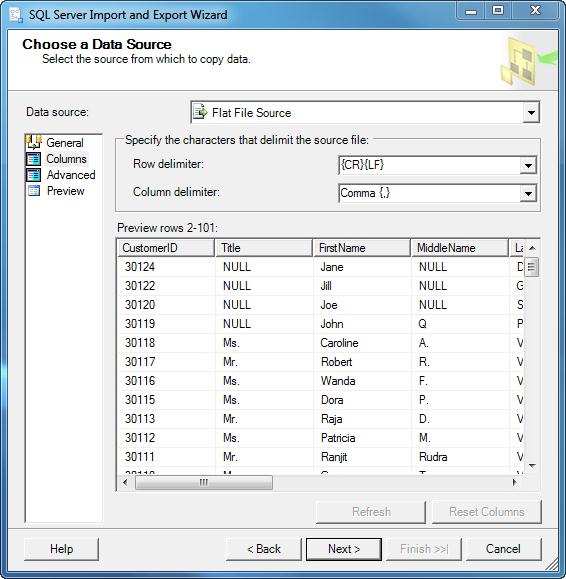
4. Remember that the wizard is looking at a flat file, so it doesn’t make many assumptions about the data contained therein. It’s up to you to go through each column in this screen and adjust data types and sizes. The following table shows a mapping of data types between the wizard and SQL Server. Click Next after you’ve made your changes.

Data Type

SQL Server

(SQLOLEDB; SQLNCLI10)

DT_BOOL

bit

DT_BYTES

binary, varbinary, timestamp

DT_CY

smallmoney, money

DT_DATE

DT_DBDATE

date

DT_DBTIME

DT_DBTIME2

time(p)

DT_DBTIMESTAMP

datetime, smalldatetime

DT_DBTIMESTAMP2

datetime2

DT_DBTIMESTAMPOFFSET

datetimeoffset(p)

DT_DECIMAL

DT_FILETIME

DT_GUID

uniqueidentifier

DT_I1

DT_I2

smallint

DT_I4

int

DT_I8

bigint

DT_NUMERIC

decimal, numeric

DT_R4

real

DT_R8

float

DT_STR

char, varchar

DT_UI1

tinyint

DT_UI2

DT_UI4

DT_UI8

DT_WSTR

nchar, nvarchar, sql_variant, xml

DT_IMAGE

image

DT_NTEXT

ntext

DT_TEXT

text

Table 1 - Data type mappings (source: http://msdn.microsoft.com/en-us/library/ms141036.aspx)

5. Here’s the part that’s not obvious. You must select .Net Framework Data Provider for SqlServer as the destination. Then, enter the following information.

· Data Source – This is the fully qualified DNS name (FQDN) of your SQL Azure server.

· Initial Catalog – This must be an existing database on the SQL Azure server.

· User ID

· Password

6. Click Edit Mappings.

7. Uncheck the Nullable box for your primary key column. Did I mention that a SQL Azure table must have a primary key? Notice that there isn’t a way to specify the primary key in this dialog. We’ll have to add that to the SQL statement manually. Click the Edit SQL button.

8. Add the “Primary Key” option to the declaration of your primary key column, and click OK.

Note: If you’re using a clustered primary key, please see SQL Server Books Online for the syntax.

9. Review the data type mappings. Note that I receive warnings about the default DT_STR types, so I ignore them.

10. Keep the default setting, Run immediately, click Next, and then click Finish on the next screen.

11. Finally, review the status of the import, and enjoy using your data in SQL Azure.

Wednesday, June 22, 2011

RS1.EXE works with SSRS 2008 R2 with SP1

Thanks to my anonymous friend, Baptiste Lefrançois, it appears that my RS1.exe build still works with SQL Server Reporting Services 2008 R2, but you need Service Pack 1. Here's my original post:


And here's the description, in my gracious friend's own words:

"Hello Joe,

Thanks for your help, I've understood my mistake but finally my problem was an official bug of SQL Server Report Service. I just want to tell you how I resolved it for next person who will be in the same situation. My problem was the LogonUser didn't return any cookie, and my authCookie was always null, never affected :( The specific error message was : "Authorization ticket not received by LogonUser". But I've already followed all recommended procedures on the msdn but never resolve my problem. My authentication form on ReportServer page worked perfectly with any web navigator, but with a console application impossible, allways the same [... :)] error =/ I've tried to authenticate thanks of navigator on ReportsManager page and... surprise I got the same error : "Authorization ticket not received by LogonUser". After lot's of search and googling , I've read an article explaining this bug. It was in fact an official bug and Microsoft published a fix whish was after included in the SQL SERVER 2008R2 SP1. I had only the SQL SERVER 2008R2 with no update. After install the SP1, I tested your "old" RS Utility for form authentication, rs1.exe. And It works perfectly now. Thank's so much ! Maybe my bug and the solution I've found will be helpfull for the future ;)

Thanks a lot, So Nice! =)

Baptiste"

Friday, April 22, 2011

XMA/ECMA call-based export does not support multi-valued attribute-level deltas

Here's a seemingly undocumented feature of the XMA/ECMA. I've got an XMA that's doing call-based exports, and I've noticed that it doesn't contain atomic add & remove operations at the item level in a multi-valued attribute list. Instead, it's giving me the entire list of items in the object's current state.

This is interesting, because when I look at the pending export in the sync engine, I see the atomic operations.


When I examine the arguments passed into the ExportEntry API call, I see a Replace at the top level, but nothing on the multi-valued attribute (member in this case).

[ExportEntry]

modificationType: Replace
changedAttributes: member
csentry: [Microsoft.MetadirectoryServices.Impl.CSEntryMAImpl] CS Role CN=ROLE-CRM-Test1
DN: CN=ROLE-CRM-Test1
ObjectClass: Microsoft.MetadirectoryServices.Impl.GenericValueCollection
ObjectType: Role
RDN: CN=ROLE-CRM-Test1
displayName [String] ROLE-CRM-Test1
member [Reference] CN=007528
CN=dev.userA
CN=dev.userB
CN=dev.userC
CN=dev.userD
CN=dev.userE
CN=dev.userF
(Wouldn't it be nice if you could just serialize the CSEntry object?)

So, I looked around on the forums, and sure enough, Markus confirms my observation:

"If members is in the list of changed attributes, the member attribute of the CSEntry contains the most recent value for this attribute.

"If you need to determine the individual change for each member, you need to calculate this. The ECMA doesn’t provide multi-valued attribute level changes."


Rebecca Croft also informs me that not even the file-based export supports item-level deltas on multi-valued attributes.

I'd love to be proven wrong about this...

Sunday, November 14, 2010

Powershell: get process ID by window name/title

Powershell is cool.

get-process | where {$_.mainwindowtitle -match "pattern"} | format-table id, name, mainwindowtitle -autosize

Friday, November 12, 2010

SSRS data processing extension, Windows integrated security, and impersonation

I've been playing around with Craig Martin's SSRS Data Processing Extension for FIM. (Great stuff; thanks for posting it, Craig!) I had to do some troubleshooting with Windows integrated security and Windows credentials stored securely on the server.

I noticed that the IDbConnection.Open method was being called as the impersonated Windows user:

2010-11-11 14:56:37,932 --4-- DEBUG [FimDataProcessingExtension.FimConnection]    

[Microsoft.ReportingServices.DataProcessing.IDbConnection.Open] Current user info:
Name : TEST\joe.zamora
IsAuthenticated : True
AuthenticationType : Kerberos
ImpersonationLevel : Impersonation

However, the IDbCommand.ExecuteReader method was not run under the context of the Windows user:

2010-11-11 14:56:37,934 --4-- DEBUG [FimDataProcessingExtension.FimConnection]    

[GetData] Current user info:
Name : TEST\svc_ssrs
IsAuthenticated : True
AuthenticationType : Kerberos
ImpersonationLevel : None

Well, turns out that this is by design. Here's the official word from Microsoft:

Impersonation and Custom Data Processing Extensions

If your custom data processing extension connects to data sources using impersonation, you must use the Open method on either the IDbConnection orIDbConnectionExtension interfaces to make the request. Alternately, you can store the user identity object (System.Security.Principal.WindowsIdentity) and then reuse it in the other data processing extension APIs.

In previous releases of Reporting Services, all custom data processing extensions were called under user impersonation. In this release, only the Open method will be called while impersonating the user. If you have an existing data processing extension that requires integrated security, you must modify your code to use the Openmethod or store the user identity object.


Thus, you should save the current Windows identity to a local variable in the IDbConnection.Open method:

if (this.integratedSecurity)
{
this.windowsIdentity = WindowsIdentity.GetCurrent();
}

And then you can use it later in the other API calls:

private WindowsImpersonationContext impersonationContext;
internal void MaybeImpersonate()
{
if (this.integratedSecurity)
{
impersonationContext = this.windowsIdentity.Impersonate();
}
}

That'll teach me for not reading the documenation. ;)

Saturday, August 21, 2010

Data source name not found and no default driver specified

Ahhh, another chance to give back to the community. It's bittersweet. It feels good to contribute, but you really go through the fire to figure out something that no one else has.

This one is an error message that I was getting from SQL Server Integration Services (SSIS). I recently inherited a package (isn't that a nice excuse :) and I switched the connection string from Windows integrated to SQL auth. Pretty standard operation, wouldn't you say? Well, I've been around the block enough to not be totally shocked when I got a few error messages:

An error occured on the SSIS Listener Microsoft.SqlServer.Dts.Runtime.Package/Connection manager "JOESPLACE\MSSQLSERVER.TEST" : SSIS Error Code DTS_E_OLEDBERROR.  An OLE DB error has occurred. Error code: 0x80004005.
An OLE DB record is available. Source: "Microsoft OLE DB Provider for ODBC Drivers" Hresult: 0x80004005 Description: "[Microsoft][ODBC Driver Manager] Data source name not found and no default driver specified".

An error occured on the SSIS Listener Microsoft.SqlServer.Dts.Runtime.TaskHost/Execute SQL Task : Failed to acquire connection "JOESPLACE\MSSQLSERVER.TEMPEST". Connection may not be configured correctly or you may not have the right permissions on this connection.

An error occured while processing the file C:\temp.txt. Details: There was an error executing the SSIS package C:\test.dtsx. Please check the event log for more information.

Okay, so there's an error in the connection string. Let the troubleshooting begin. The thing about this little guy is that he just wouldn't go away. I tried a bunch of different changes to the connection string; nothing worked.

This package is a little different because we're using a variable to specify the table. I suspected that this had something to do with it, so I tried a bunch of different things. It must have been after I switched to an existing table and then back to the table variable that it started working. I didn't know it at the time, because I was being a little sloppy with my trial-and-error.

Anyway, after I got it to work, I compared the dtsx files before and after. Then, starting with the original version, I made one change at a time until it worked. Turns out that the fix was totally a one-liner. Aaarrggghhh! ...and here it is:

<property id="5852" name="OpenRowset" dataType="System.String" state="default" isArray="false" description="Specifies the name of the database object used to open a rowset." typeConverter="" UITypeEditor="" containsID="false" expressionType="None">[dbo].[TEMPEST]</property>


In the original file, the entry was blank; that's it.

A couple more bizarre things about this problem:


  • The package would run in Visual Studio, but not after being published.
  • I deleted the [dbo].[TEMPEST] table and it still worked.


I meant to fix this a while back, but just now got around to it. I think the problem was actually that I was missing the driver in the connection string, just like the error message suggests. Evidently, you can't just use any old .NET connection string; it has to have the driver in it. Ugh.

Thursday, June 10, 2010

Built-in SSRS 2008 Roles

I couldn't find a satisfactory permission matrix for the built-in SSRS 2008 roles, so I'm publishing one here. This is a pretty comprehensive list; you may have to maximize your browser window for this!

For completeness, I'll mention that you can manage these roles by connecting to a Reporting Services instance and browsing the Security folder.

If you connect to the database engine, you can find the permissions encapsulated in the TaskMask column of the Roles table, in the ReportServer database. I would avoid editing the permissions there.

Enjoy!

Built-in RoleSystem AdministratorSystem User
DescriptionView and modify system role assignments, system role definitions, system properties, and shared schedules.View system properties and shared schedules.
TaskMask110101011001010001
TaskDescription
Manage rolesCreate, view, modify and delete role definitions.X
Manage report server securityView and modify system-wide role assignments.X
View report server propertiesView properties that apply to the report server.X
Manage report server propertiesView and modify properties that apply to the report server and to items managed by the report server.X
View shared schedulesView a predefined schedule that has been made available for general use.X
Manage shared schedulesCreate, view, modify and delete shared schedules used to run reports or refresh a report.X
Generate eventsProvides an application with the ability to generate events within the report server namespace.
Manage jobsView and cancel running jobs.X
Execute Report DefinitionsStart execution from report definition without publishing it to Report Server.XX


Built-in RoleBrowserContent ManagerMy ReportsPublisherReport Builder
DescriptionMay view folders, reports and subscribe to reports.May manage content in the Report Server. This includes folders, reports and resources.May publish reports and linked reports; manage folders, reports and resources in a users My Reports folder.May publish reports and linked reports to the Report Server.May view report definitions.
TaskMask00101010010001001111111111111111011111111101100001010101000010100010101001000101
TaskDescription
Set security for individual itemsView and modify security settings for reports, folders, resources, and shared data sources.X
Create linked reportsCreate linked reports and publish them to a report server folder.XXX
View reportsView reports and linked reports in the folder hierarchy; view report history snapshots and report properties.XXXX
Manage reportsCreate, and delete reports; and modify report properties.XXX
View resourcesView resources in the folder hierarchy; and view resource properties.XXXX
Manage resourcesCreate, modify and delete resources, and modify resource properties.XXX
View foldersView folder items in the folder hierarchy; and view folder properties.XXXX
Manage foldersCreate, view and delete folders; and view and modify folder properties.XXX
Manage report historyCreate, view, and delete report history snapshots; and modify report history properties.XX
Manage individual subscriptionsEach user can create, view, modify and delete subscriptions that he or she owns.XXXX
Manage all subscriptionsView, modify, and delete any subscription regardless of who owns the subscription.X
View data sourcesView shared data source items in the folder hierarchy; and view data source properties.XX
Manage data sourcesCreate and delete shared data source items; and modify data source properties.XXX
View modelsView models in the folder hierarchy, use models as data sources for a report, and run queries against the model to retrieve data.XXX
Manage modelsCreate, view, and delete models; and view and modify model properties.XX
Consume reportsReads report definitionsXX